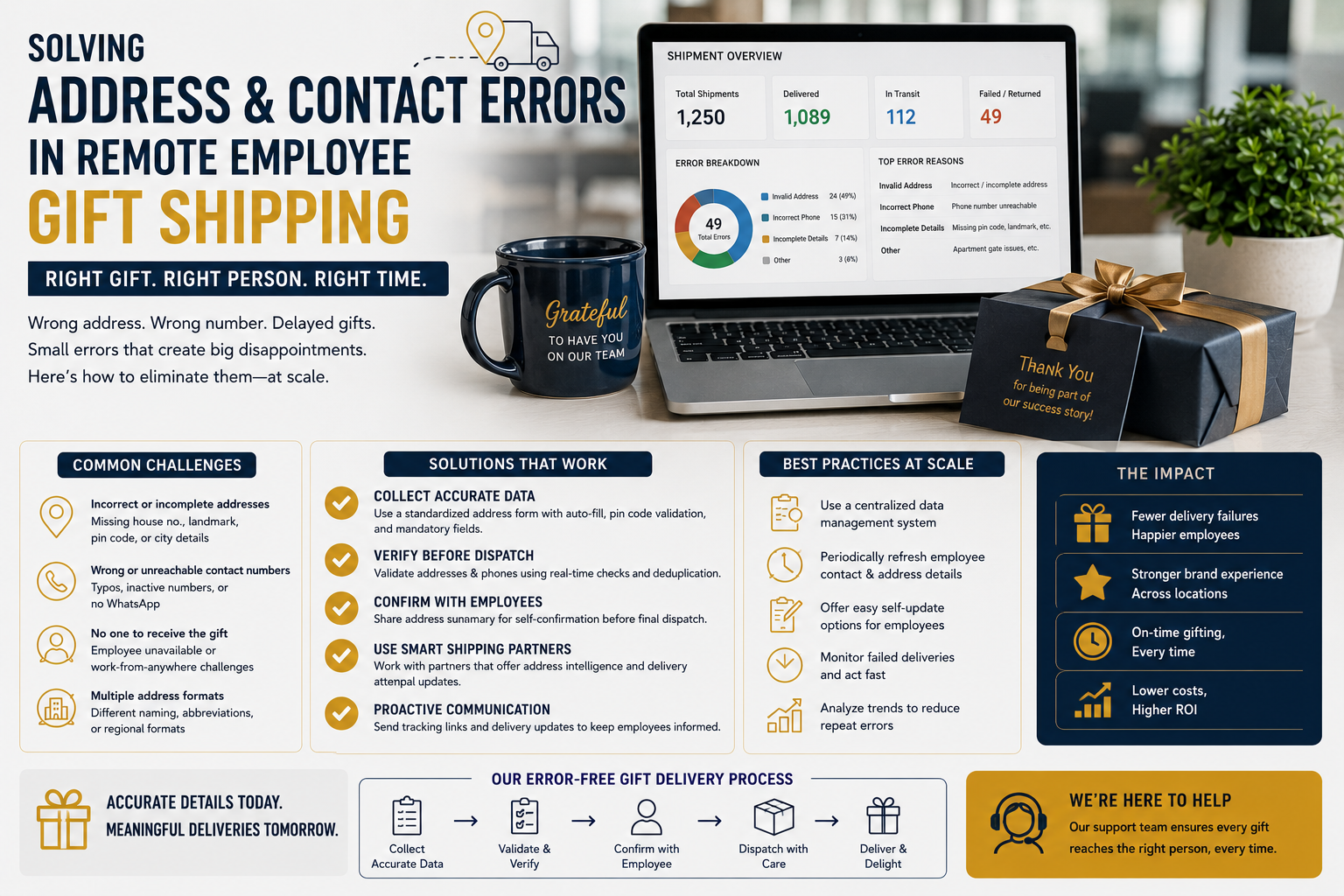
Solving Address & Contact Errors in Remote Employee Gift Shipping
Remote and hybrid work have changed the way companies manage employee gifting.
When employees work from different cities, from home, or across multiple regions, sending a corporate gift is no longer as simple as delivering 500 boxes to one office.
HR and People Ops teams now have to manage hundreds or thousands of individual addresses, mobile numbers, PIN codes, delivery preferences, and last-minute employee changes.
That creates a major operational challenge: employee address errors gifting campaigns can lead to failed deliveries, returned packages, additional courier charges, delayed gifts, and frustrated employees.
The good news is that most address and contact problems can be prevented before the gifts leave the fulfillment center.
The key is to treat recipient data as an important part of the gifting process—not as an administrative detail handled at the end.
This guide explains how HR and People Ops teams can reduce address errors, improve contact accuracy, manage remote employee gift shipping, and create a smoother delivery experience at scale.

Why Address Errors Are Common in Remote Employee Gifting
Office-based gifting has one major advantage: employees share a common delivery location.
Remote gifting is different.
One campaign may involve employees living in:
- Different cities
- Different states
- Different PIN codes
- Apartments
- Gated communities
- Independent houses
- Co-working spaces
- Temporary residences
Employees may also change addresses between the time the gifting campaign is planned and the time the gifts are dispatched.
Common problems include:
- Incorrect house or apartment number
- Missing PIN code
- Wrong city
- Old address
- Incomplete landmark
- Incorrect mobile number
- Typographical errors
- Recipient name mismatch
- Employee relocation
- Duplicate addresses
- Recipient unavailable during delivery
Even one incorrect field can cause a delivery exception.
1. Start With a Dedicated Gifting Address Form
Don’t rely entirely on an old HR database.
Employee information collected for payroll or internal administration may not be suitable for courier delivery.
Create a dedicated gifting form that asks only for information required to complete the delivery.
Recommended fields include:
- Full recipient name
- Mobile number
- House/flat number
- Building or society name
- Street/locality
- Landmark
- City
- State
- PIN code
- Email address
- Optional delivery instructions
A dedicated form allows employees to confirm their information specifically for the gifting campaign.
2. Explain Why Accurate Information Matters
Employees are more likely to provide accurate information when they understand why it is required.
Instead of simply asking:
“Please submit your address.”
HR can communicate:
“Please verify your delivery details carefully. Your corporate gift will be shipped directly to the address provided, and incorrect information may result in delivery delays or additional shipping attempts.”
A simple explanation can improve response quality.
3. Make Full Address Completion Mandatory
Avoid relying on optional address fields.
A delivery form should require the most important information before submission.
At minimum, require:
Name + Mobile + Address + City + State + PIN code
For apartment or gated-community addresses, building and unit information may also be essential.
The form should prevent submission when critical fields are empty.
4. Validate PIN Codes
PIN code errors are among the most important address issues to catch before dispatch.
An employee may accidentally enter:
226001
instead of:
226011
A single digit can change the delivery area.
Use validation wherever possible to check whether the PIN code corresponds logically with the selected city/state.
However, validation should be treated as an error-prevention tool rather than a substitute for employee confirmation.
5. Standardize Address Formatting
Employees may submit addresses in completely different formats.
For example:
Flat 402, ABC Heights, Gomti Nagar, Lucknow – 226010
versus:
402 ABC GOMTI NAGAR LKO
Standardize the information before sending it to the fulfillment partner.
A consistent format makes addresses easier to:
- Read
- Verify
- Pack
- Upload
- Track
6. Collect Mobile Numbers Carefully
A correct address is not always enough.
Couriers often need to contact recipients when:
- They cannot locate the address
- The recipient is unavailable
- Building security restricts entry
- A delivery attempt needs clarification
Make the mobile number a required field.
Before dispatch, check for obvious problems such as:
- Missing digits
- Incorrect number length
- Accidental spaces
- Repeated placeholder numbers
For corporate gifting, the mobile number should be used strictly for delivery-related communication and handled according to the organization’s privacy practices.
7. Give Employees a Data-Confirmation Deadline
Do not collect addresses indefinitely.
Set a clear deadline.
For example:
Address collection closes → 10 days before dispatch
Then:
Data validation → 7 days before dispatch
Then:
Final address freeze → 5 days before dispatch
The exact timeline depends on the size of the campaign and shipping requirements.
The principle is important:
There should be a defined point after which the primary shipping file is locked.
8. Send a Final Confirmation Message
Before the data is frozen, give employees one final opportunity to verify their information.
For example:
“Your corporate gift will be delivered to the address currently recorded for you. Please review your details and submit any correction before [deadline].”
This catches many errors before fulfillment begins.
9. Create a Master Shipping File
After collecting employee information, create one controlled shipping file.
A useful structure is:
| Employee ID | Name | Mobile | Address | City | State | PIN | Status |
|---|---|---|---|---|---|---|---|
| EMP001 | Rahul Sharma | XXXXX | Verified | Lucknow | UP | 226010 | Ready |
| EMP002 | Priya Mehta | XXXXX | Verified | Mumbai | MH | 400001 | Ready |
The master file should be the primary reference used by the gifting vendor or fulfillment team.
Avoid sending multiple versions of the recipient list through different emails.
10. Use Employee IDs
Employee IDs are useful when multiple employees have similar or identical names.
For example:
Amit Kumar — EMP101
Amit Kumar — EMP287
The employee ID connects the recipient to:
- Address
- Gift
- Personalization
- Packaging
- Shipment
- Delivery status
The ID does not necessarily need to appear on the final package.
It is primarily an internal tracking reference.
11. Separate Verified and Unverified Addresses
Don’t treat every submitted address as ready for dispatch.
Use simple statuses such as:
Verified
Needs Review
Incomplete
Employee Confirmation Required
This helps HR and People Ops focus attention on the records that actually need intervention.
12. Create an Exception List
Instead of repeatedly reviewing the entire database, create an exception list.
Examples:
- Missing PIN code
- Invalid mobile number
- Incomplete address
- Duplicate record
- Employee did not respond
- Address outside courier service area
- Employee requested a late change
This makes the validation process significantly more manageable for large organizations.
13. Don’t Guess Missing Information
If an employee provides:
“Near City Mall, Lucknow”
don’t allow someone to guess the rest of the address.
Contact the employee and request the missing information.
Guessing can result in:
- Failed delivery
- Incorrect delivery
- Privacy concerns
- Return-to-origin charges
Accurate information is more important than rushing the shipment.
14. Plan for Employees Who Don’t Respond
Not every employee will submit or confirm their address on time.
Create a defined process.
For example:
Reminder 1 → Email
Reminder 2 → HR/internal communication
Final reminder → Escalation to manager or People Ops contact
The process should be consistent and respectful.
For high-volume campaigns, establish a cutoff after which unconfirmed addresses are excluded from the first dispatch batch or handled separately.
15. Handle Last-Minute Address Changes
An employee may move shortly before a gifting campaign.
Once the shipping file is finalized, changes should be controlled.
Create two categories:
Before Dispatch
Address can generally be updated in the master file.
After Dispatch
The change may require:
- Courier rerouting
- Delivery hold
- Address correction
- New shipment
- Return and reshipment
This distinction helps HR understand the operational consequences of late changes.
16. Track Shipment Status by Employee
Connect the shipping record to the courier tracking number.
A useful structure is:
Employee ID → Address → Gift → Tracking Number → Status
For example:
| Employee | Tracking | Status |
|---|---|---|
| EMP001 | XXXXX | Delivered |
| EMP002 | XXXXX | In Transit |
| EMP003 | XXXXX | Address Issue |
| EMP004 | XXXXX | Out for Delivery |
This allows People Ops to identify delivery problems without manually searching through hundreds of courier records.
17. Monitor Failed Delivery Attempts
A failed first attempt does not necessarily mean the package cannot be delivered.
The issue might be:
- Recipient unavailable
- Incorrect contact number
- Courier couldn’t locate address
- Security restriction
- Delivery timing problem
The sooner the issue is identified, the easier it is to resolve.
Create an exception workflow:
Failed attempt → Identify reason → Contact recipient → Correct issue → Reattempt delivery
18. Give Recipients a Delivery Window
Remote employees may not always be available at the delivery address.
Providing an estimated delivery window helps recipients prepare.
A simple notification can say:
“Your corporate gift has been dispatched and is expected to arrive between [date] and [date]. Please keep your phone available for courier communication.”
This can reduce failed delivery attempts.
19. Consider Delivery Instructions
Some remote addresses require additional information.
Useful instructions may include:
- Call before delivery
- Leave package with authorized security
- Contact recipient on arrival
- Building entry instructions
- Preferred receiving location
However, delivery instructions should be practical and compatible with the courier’s policies.
20. Keep a Replacement and Reshipment Process
Even with strong validation, some deliveries will fail.
A replacement workflow should define:
- Who approves reshipment
- Who pays the additional shipping cost
- Whether the original package must be returned
- How the new tracking number is recorded
- How the employee is notified
For personalized gifts, replacement timelines may be longer because the product may need to be customized again.
Address Error Prevention Checklist
Before sending remote employee gifts, HR and People Ops teams should verify:
Employee Data
- Full name confirmed
- Mobile number verified
- Employee ID recorded
- Recipient status confirmed
Address
- House/flat number included
- Building/society included
- Locality included
- City confirmed
- State confirmed
- PIN code checked
- Landmark included where useful
Delivery
- Courier serviceability checked
- Delivery timeline confirmed
- Tracking number assigned
- Recipient notification planned
Exceptions
- Incomplete addresses identified
- Non-responsive employees listed
- Address changes separated
- Failed deliveries monitored
Common Mistakes in Employee Address Errors Gifting
Using Old HR Records Without Confirmation
An HR database may contain an address that is no longer appropriate for delivery.
Allowing Free-Text Without Validation
Unstructured information increases the possibility of missing details.
Sending Multiple Shipping Files
This can create conflicting versions of recipient information.
Changing Addresses After Dispatch Without Tracking
Late changes can become difficult and expensive to manage.
Ignoring Contact Numbers
Couriers often need mobile communication to complete delivery.
Treating Every Failed Delivery as a Courier Problem
The root cause may be incorrect recipient information.
Not Tracking Reshipments
Replacement shipments should remain connected to the original employee record.
A Practical Workflow for Remote Employee Gift Shipping
A scalable process can be organized into eight stages.
Stage 1: Collect
Send employees a dedicated gifting address form.
Stage 2: Validate
Check mandatory fields, PIN codes, phone numbers, and address completeness.
Stage 3: Confirm
Send employees a final verification message.
Stage 4: Freeze
Lock the final shipping database.
Stage 5: Fulfill
Share the verified file with the gifting and logistics team.
Stage 6: Track
Connect each employee record with its shipment tracking number.
Stage 7: Resolve
Handle address issues, failed attempts, delays, and reshipments.
Stage 8: Close
Confirm successful delivery and reconcile unresolved exceptions.
Final Thoughts
Remote employee gifting can create a powerful employee experience, but only when the logistics work properly.
For HR and People Ops teams, employee address errors gifting should be treated as a preventable operational risk rather than an unavoidable part of large-scale delivery.
The strongest approach is to collect fresh delivery information, validate it systematically, create a single master shipping database, use employee IDs, establish a data-freeze deadline, and maintain a dedicated exception process.
Most importantly, don’t wait until gifts are dispatched to discover that an address is incomplete.
Address validation should happen before personalization, packaging, and shipping—not after a delivery fails.
With the right process, organizations can confidently send gifts to hundreds or thousands of remote employees while reducing failed deliveries, unnecessary reshipping costs, administrative workload, and employee frustration.
The ultimate goal is simple:
The right gift, sent to the right employee, at the right address, at the right time.
Leave a comment