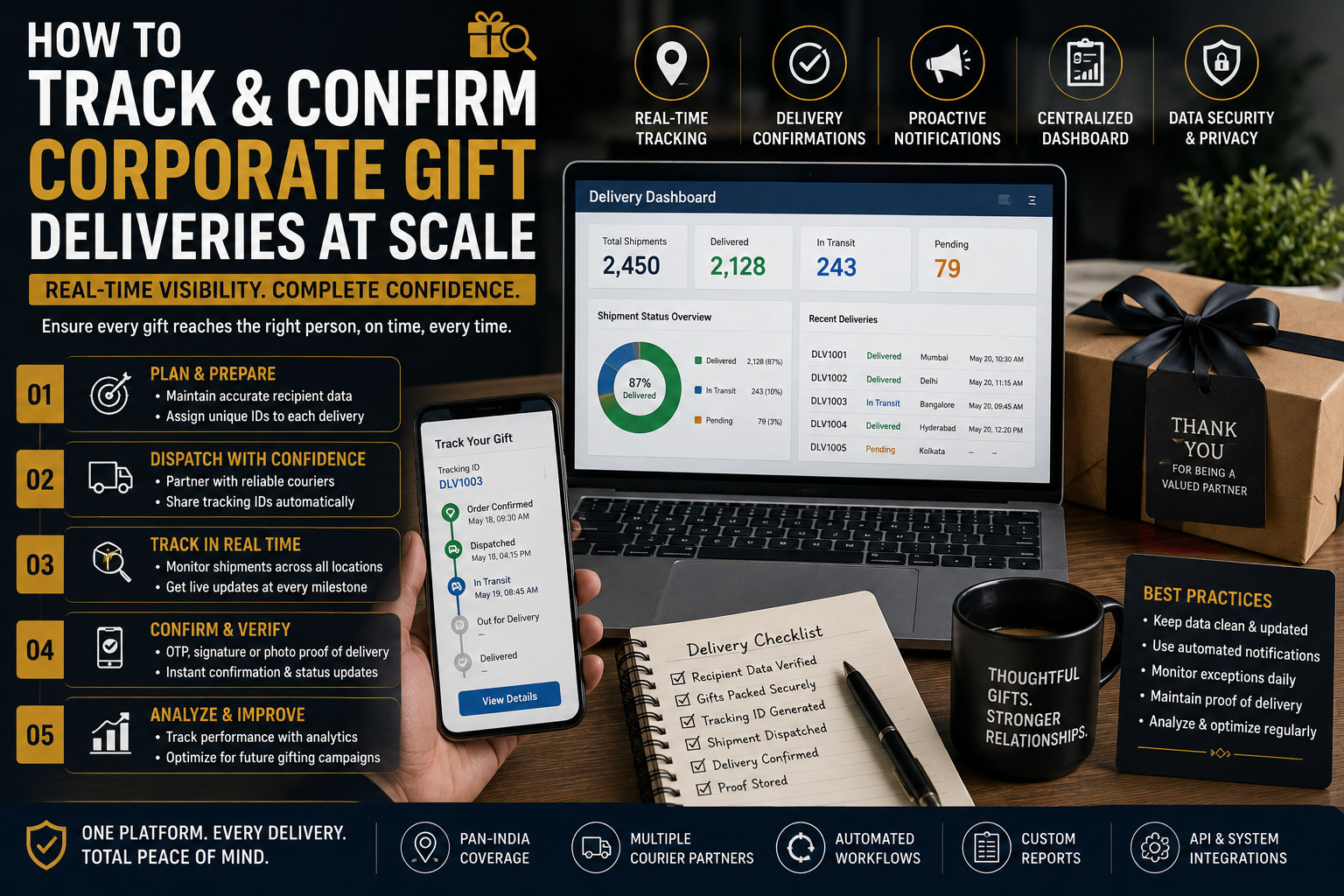
How to Track & Confirm Corporate Gift Deliveries at Scale
Managing corporate gifting for 20 or 30 recipients is relatively simple. Tracking hundreds or thousands of gifts across multiple cities, offices, and individual addresses is a completely different operational challenge.
For Procurement and Admin teams, the real work does not end when gifts are packed and dispatched. The team must know which gifts have shipped, where they are, which recipients have received them, which deliveries are delayed, and which shipments require intervention.
This is why businesses need a structured system to track bulk gift deliveries.
Without centralized tracking, even a successful gifting campaign can become difficult to manage. Procurement teams may have to search through emails for tracking numbers, contact couriers individually, or depend on recipients to report whether their gifts arrived.
A scalable delivery-tracking process solves this problem by creating visibility from dispatch through final confirmation.
This guide explains how Procurement and Admin teams can build an efficient corporate gift delivery tracking system for large-scale campaigns.

Why Tracking Bulk Gift Deliveries Matters
Corporate gifts often involve multiple moving parts:
- Hundreds or thousands of recipients
- Multiple delivery locations
- Different courier routes
- Different delivery timelines
- Personalized gifts
- Branch-wise shipments
- Individual tracking numbers
- Failed delivery attempts
- Damaged or missing packages
- Replacement shipments
When there is no centralized system, these details can quickly become difficult to manage.
A strong tracking process gives the team answers to important questions:
How many gifts have been dispatched?
How many are in transit?
How many have been delivered?
Which shipments are delayed?
Which recipients have not received their gifts?
Which deliveries require escalation?
The objective is not simply to track parcels. It is to create operational visibility and accountability.
1. Create a Master Delivery Tracker
The foundation of large-scale delivery management is a centralized tracker.
A spreadsheet, logistics platform, or internal dashboard can contain fields such as:
| Field | Purpose |
|---|---|
| Recipient Name | Identifies recipient |
| Company/Branch | Identifies destination |
| City | Supports regional tracking |
| Contact Number | Helps resolve delivery issues |
| Gift Type | Identifies shipment contents |
| Quantity | Prevents shortages |
| Tracking Number | Enables courier tracking |
| Courier | Identifies logistics partner |
| Dispatch Date | Measures fulfillment progress |
| Expected Delivery | Establishes deadline |
| Current Status | Shows shipment progress |
| Delivery Date | Confirms completion |
| Exception | Records problems |
| Confirmation | Confirms receipt |
The important principle is simple:
Every shipment should have one record.
2. Assign a Unique Shipment ID
Tracking numbers come from courier partners, but internal teams should also maintain their own reference ID.
For example:
AG-DEL-00125
or
DIWALI-MUM-00482
This internal ID can connect the shipment to:
- Recipient
- Branch
- Gift type
- Invoice
- Purchase order
- Courier tracking number
If the courier tracking number changes or multiple courier partners are used, the internal reference remains consistent.
3. Use Standard Delivery Statuses
Different teams may describe the same shipment differently.
One person might write “On the way,” another might write “Dispatched,” and another might write “Transit.”
Create a standard status system.
A useful workflow is:
Order Confirmed → Processing → Packed → Dispatched → In Transit → Out for Delivery → Delivered → Exception
This makes reporting much easier.
For example, Procurement can immediately determine how many shipments are:
- Still being prepared
- In transit
- Out for delivery
- Successfully delivered
- Facing problems
4. Separate Dispatch Confirmation From Delivery Confirmation
This distinction is important.
A courier marking a shipment as dispatched does not mean the recipient has received it.
Similarly:
Shipment created ≠ Shipment dispatched
and
Shipment delivered in system ≠ Gift confirmed by recipient
The tracking process should therefore contain separate milestones.
Dispatch Confirmation
Confirms that the package has left the fulfillment location.
Delivery Confirmation
Confirms that the package reached the intended recipient or authorized receiving point.
This prevents teams from incorrectly treating dispatched orders as completed deliveries.
5. Validate Recipient Data Before Dispatch
Accurate tracking starts with accurate shipping information.
Before generating shipping labels, verify:
- Recipient name
- Mobile number
- Address
- City
- State
- PIN code
- Office/branch
- Landmark where required
For employee gifting, also confirm whether the recipient is:
- Working from the office
- Working remotely
- Transferred to another branch
- On leave
- No longer with the organization
A tracking system cannot solve incorrect recipient information.
6. Freeze the Final Recipient List
Large gifting campaigns often suffer from last-minute changes.
One employee may change offices while another may provide a new address.
Set a clear data-freeze deadline before dispatch.
For example:
Final recipient confirmation → 5 business days before shipment
After the freeze, changes should be handled through a controlled exception process.
This reduces incorrect labels, duplicate shipments, and last-minute confusion.
7. Track by Batch
Instead of treating thousands of gifts as one order, divide them into manageable batches.
For example:
Batch 1 — Delhi
Batch 2 — Mumbai
Batch 3 — Bengaluru
Batch 4 — Hyderabad
or:
Batch A — Employees
Batch B — Clients
Batch C — VIP recipients
Batch tracking makes it easier to identify where a delay is occurring.
8. Use a Dashboard for Large Campaigns
A dashboard can give Procurement and Admin teams a quick overview.
For example:
| Status | Shipments |
|---|---|
| Packed | 150 |
| Dispatched | 300 |
| In Transit | 425 |
| Out for Delivery | 75 |
| Delivered | 950 |
| Exception | 20 |
The dashboard should answer one question immediately:
“Where does the campaign stand right now?”
This is much more efficient than checking individual courier pages.
9. Monitor Exceptions Separately
Not every shipment needs the same level of attention.
A normal shipment can continue through the standard process.
An exception requires intervention.
Common exceptions include:
- Address incorrect
- Recipient unavailable
- Delivery attempted
- PIN code issue
- Shipment delayed
- Package damaged
- Package lost
- Recipient refused delivery
- Return to origin
Create a dedicated Exception column so these shipments are immediately visible.
10. Establish an Escalation Timeline
Don’t wait indefinitely for delayed shipments.
Create predefined escalation rules.
For example:
No movement for 24 hours → Monitor
No movement for 48 hours → Contact courier
Delivery delayed beyond promised date → Escalate
Repeated delivery attempt failure → Contact recipient
The exact time thresholds can vary by courier and destination, but the principle remains the same:
Every exception should have a defined next action.
11. Confirm Delivery at the Branch Level
For office-based gifting, courier tracking may not be enough.
A shipment can be marked “delivered” when it reaches the office reception or security desk.
But the gifts may not yet have reached the intended employees.
For branch-based campaigns, use a two-stage confirmation:
Courier delivery → Branch receipt → Recipient distribution
The branch coordinator can confirm that the correct quantity arrived before distributing the gifts.
12. Use Recipient Confirmation for High-Value Gifts
For premium or VIP corporate gifts, consider collecting a delivery confirmation from the recipient or authorized recipient contact.
Depending on the campaign, confirmation can be through:
- Internal communication platform
- Digital acknowledgement
- Signed receipt
- Delivery confirmation form
For routine low-value gifting, this may not be necessary for every recipient.
The level of confirmation should match the value and importance of the shipment.
13. Reconcile Quantity After Delivery
Delivery confirmation should also include quantity verification.
Suppose a branch was supposed to receive:
100 gifts
but received:
96 gifts
The courier may still show the shipment as delivered.
Therefore, branch-level reconciliation is important.
Track:
Expected Quantity → Delivered Quantity → Difference
Any discrepancy should trigger an investigation.
14. Maintain Proof of Delivery
For large corporate gifting programs, retain appropriate delivery records.
Depending on the logistics process, this may include:
- Courier delivery status
- Delivery timestamp
- Recipient acknowledgement
- Branch confirmation
- Delivery receipt
- Relevant shipment documentation
This can be useful when resolving disputes or reviewing campaign performance.
15. Communicate Delivery Expectations to Recipients
Recipients should know when they can expect their gifts.
A simple message can reduce unnecessary questions:
“Your corporate gift has been dispatched and is expected to arrive between 2026 and 2026. You may receive a delivery notification from the courier.”
For larger campaigns, automated or standardized communication can reduce the workload on Admin teams.
16. Don’t Over-Rely on Manual Tracking
Manual tracking can work for small campaigns.
But when the number of shipments increases significantly, manually checking every courier page becomes inefficient.
For larger programs, consider using:
- Centralized shipment dashboards
- Courier tracking integrations
- Automated status updates
- Spreadsheet automation
- Delivery management software
The goal is to reduce repetitive administrative work.
17. Track Courier Performance
Delivery tracking should not only monitor the current campaign.
The collected data can help Procurement evaluate logistics partners.
Useful metrics include:
On-time delivery rate
Delivery attempt success rate
Damage rate
Return-to-origin rate
Average delivery time
Exception rate
This information can influence future courier selection.
A courier offering a slightly lower price may not be the most economical option if its delay or damage rate is significantly higher.
18. Measure Delivery Success Rate
One of the most useful campaign metrics is:
Delivery Success Rate = Successfully Delivered Gifts ÷ Total Gifts Dispatched × 100
For example:
If 2,000 gifts were dispatched and 1,960 were successfully delivered:
1,960 ÷ 2,000 × 100 = 98%
This gives Procurement teams a clear measure of operational performance.
Other useful metrics include:
- Average delivery time
- Percentage delivered on schedule
- Number of exceptions
- Number of replacements
- Number of failed deliveries
19. Create a Replacement Workflow
Some shipments will inevitably require replacement.
Instead of treating replacements as separate orders, connect them to the original shipment.
For example:
Original Shipment ID: AG-4582
Issue: Damaged gift
Replacement ID: AG-4582-R1
This keeps the history connected.
The tracker should show:
Original → Problem → Action → Replacement → Final Delivery
This is particularly useful for premium and VIP gifting campaigns.
20. Conduct a Post-Campaign Delivery Audit
Once the campaign is complete, don’t immediately archive the tracker.
Review the data.
Ask:
- What percentage was delivered on time?
- Which locations had the most delays?
- Which courier performed best?
- Which products experienced damage?
- How many address errors occurred?
- How many replacement shipments were required?
- Where did internal coordination fail?
This turns one gifting campaign into useful information for the next campaign.
A Scalable Corporate Gift Delivery Tracking Workflow
A practical workflow for Procurement and Admin teams can look like this:
Step 1: Prepare Recipient Data
Validate all names, addresses, contact details, and quantities.
Step 2: Assign Internal Shipment IDs
Create a unique reference for every shipment.
Step 3: Pack and Dispatch
Record the dispatch date and courier tracking number.
Step 4: Update Status
Move each shipment through standardized statuses.
Step 5: Monitor Exceptions
Flag delayed, failed, damaged, or returned shipments.
Step 6: Confirm Delivery
Record courier delivery confirmation and branch/recipient confirmation where appropriate.
Step 7: Reconcile
Compare expected versus delivered quantities.
Step 8: Resolve Exceptions
Arrange replacements or re-delivery.
Step 9: Close the Shipment
Mark the shipment as completed only after the required confirmation has been received.
Bulk Gift Delivery Tracking Checklist
Before launching a large campaign, confirm:
Data
- Recipient list finalized
- Addresses verified
- Mobile numbers checked
- Quantities confirmed
Logistics
- Courier selected
- Serviceability checked
- Delivery timelines confirmed
- Tracking process established
Tracking
- Internal shipment IDs created
- Courier tracking numbers recorded
- Standard statuses defined
- Dashboard prepared
Exceptions
- Escalation process established
- Replacement process defined
- Contact persons identified
Confirmation
- Delivery confirmation method established
- Branch reconciliation planned
- Proof-of-delivery records retained where required
Common Tracking Mistakes to Avoid
Using Multiple Unconnected Spreadsheets
This creates duplicate or conflicting information.
Tracking Only Courier Numbers
A tracking number doesn’t tell you which internal recipient or branch it belongs to unless the data is connected.
Treating “Delivered” as the End of the Process
For branch-based gifting, internal distribution may still be pending.
Ignoring Exceptions
Delayed shipments become harder to resolve when intervention happens too late.
Failing to Track Replacements
Replacement shipments should remain connected to the original order.
Not Reviewing Historical Data
Every campaign produces valuable logistics information. Use it to improve future campaigns.
Final Thoughts
The ability to track bulk gift deliveries efficiently is an important part of modern corporate gifting operations.
For Procurement and Admin teams, delivery management should provide more than a list of courier tracking numbers. It should create a complete view of the campaign—from recipient data and dispatch to final delivery confirmation and exception resolution.
Start with a centralized master tracker. Assign internal shipment IDs. Standardize delivery statuses. Track by branch or batch. Monitor exceptions proactively and establish clear escalation timelines.
For large campaigns, automate repetitive tracking wherever practical and use delivery data to evaluate courier performance.
Most importantly, define what “complete” means.
A gift campaign is not necessarily complete when the courier marks a parcel as delivered. It is complete when the organization has reasonable confirmation that the right gift reached the right recipient or authorized location in the expected condition.
With the right tracking system, even thousands of corporate gifts can be managed with greater visibility, fewer errors, faster issue resolution, and significantly less administrative effort.
Leave a comment