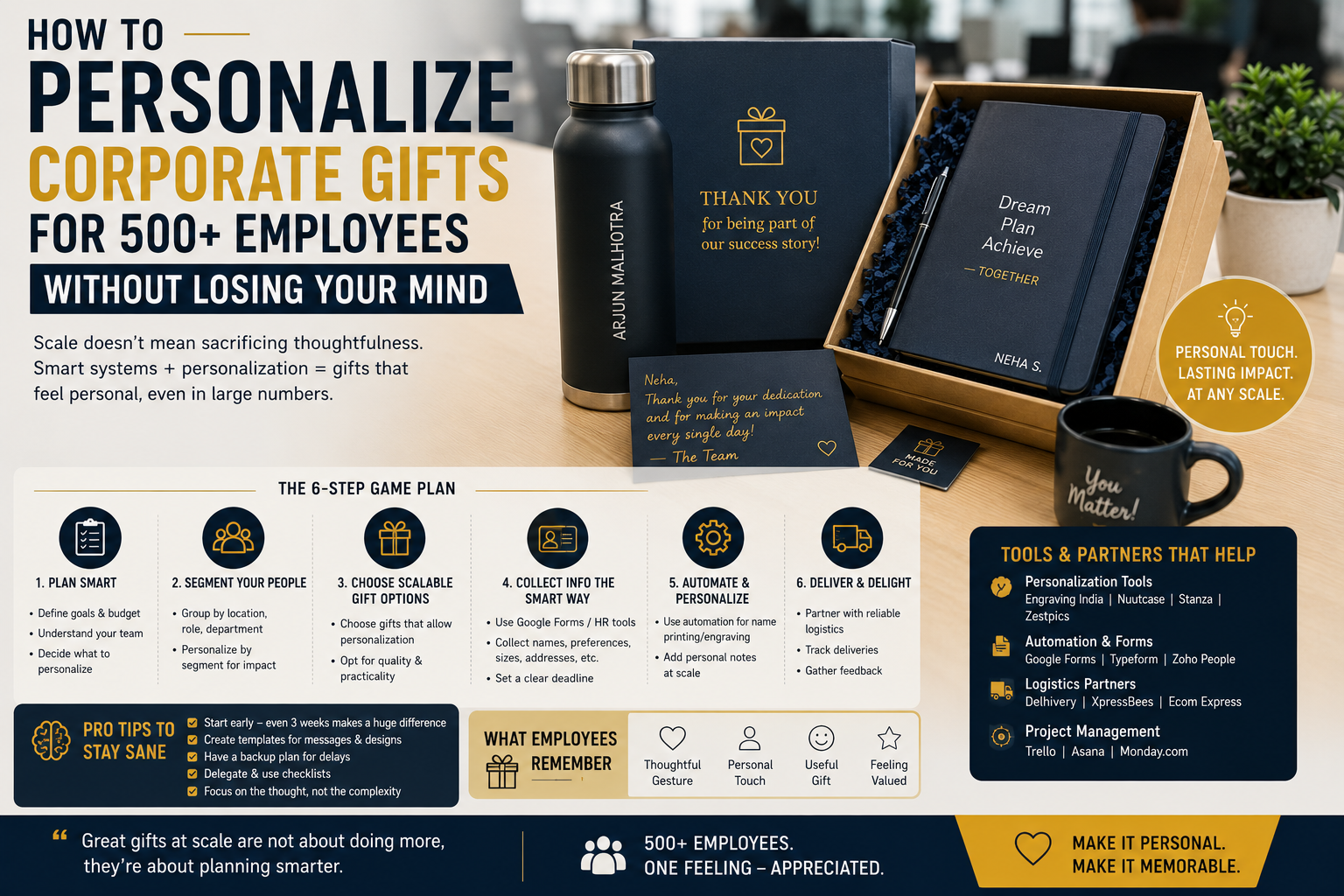
How to Personalize Corporate Gifts for 500+ Employees Without Losing Your Mind
Personalizing corporate gifts sounds simple when the requirement is for 20 or 30 employees.
But when the order reaches 500+ employees, personalization can quickly become an operational challenge.
Names need to be accurate. Departments may have different requirements. Employees may work across multiple offices. Some may need different gift variants or sizes. Packaging needs to remain consistent. And Procurement and Admin teams still need to manage budgets, production timelines, quality checks, and delivery.
The solution is not to eliminate personalization.
It is to build a personalization system that can handle scale.
For large employee gifting programs, the right process combines structured data, standardized products, controlled customization, quality checks, and organized delivery tracking. This allows companies to create a personal gifting experience without turning the project into hundreds of individual orders.
This guide explains how Procurement and Admin teams can personalize gifts for 500+ employees efficiently while minimizing errors, delays, and unnecessary administrative work.

Why Personalizing 500+ Corporate Gifts Is Difficult
Personalization introduces additional variables into a bulk gifting project.
A standard bulk order might require:
500 gifts → 500 identical products
A personalized campaign could involve:
500 gifts → 500 names → Multiple departments → Multiple locations → Different packaging requirements → Individual delivery information
A single incorrect letter can result in a wrongly personalized gift.
The most common challenges include:
- Spelling mistakes
- Duplicate names
- Incorrect employee information
- Last-minute employee changes
- Different product variants
- Artwork approval delays
- Manual data entry
- Packaging mix-ups
- Delivery errors
- Difficult quality control
The answer is not more manual work.
The answer is better process design.
1. Start With a Clean Employee Database
Before selecting products or discussing customization, create a master employee database.
The database should contain only the information required for the gifting project.
Useful fields may include:
- Employee ID
- Employee name
- Department
- Designation
- Office location
- Delivery address
- Mobile number
- Gift variant
- Personalization text
- Quantity
For example:
| Employee ID | Name | Department | Location | Personalization |
|---|---|---|---|---|
| EMP001 | Rahul Sharma | Sales | Delhi | Rahul |
| EMP002 | Priya Mehta | HR | Mumbai | Priya |
| EMP003 | Arjun Kapoor | Finance | Bengaluru | Arjun |
This master file should become the single source of truth for personalization.
2. Establish a Data-Freeze Date
Employee information changes.
People join, leave, transfer departments, move offices, or update their addresses.
If personalization starts before the employee list is finalized, changes can create unnecessary rework.
Set a clear deadline:
Final employee data → Approval → Personalization → Production
For example, the organization might establish a data-freeze date several business days before production.
After the freeze, any changes should follow an exception process.
This prevents constant updates from disrupting production.
3. Decide What Actually Needs Personalization
Not every part of the gift needs to be personalized.
For 500+ employees, selective personalization is often more efficient.
High-Impact Personalization
- Employee name
- Initials
- Personalized message
- Department-specific card
Standard Elements
- Company logo
- Brand colors
- Packaging
- Product design
This creates a useful balance:
Personal where it matters + Standard where efficiency matters.
For example, a premium notebook can have the employee’s name while the box, sleeve, and message card remain standardized.
4. Choose Products That Are Easy to Personalize at Scale
Not every corporate gift is equally suitable for 500+ personalized orders.
Good choices generally have a defined personalization area.
Examples include:
- Notebooks
- Pens
- Bottles
- Mugs
- Card holders
- Desk accessories
- Bags
- Apparel
- Gift boxes
Before selecting a product, ask the vendor:
“Can you personalize 500+ units consistently using one approved production process?”
The answer is more important than whether the product looks attractive in a catalogue.
5. Use One Master Artwork
Multiple artwork versions increase complexity.
Whenever possible, create one approved master design.
For example:
Company Logo + Employee Name + Standard Message
Only the employee name changes.
This keeps the visual identity consistent and reduces the number of production variables.
If the organization needs department-specific variations, keep them limited and clearly defined.
For example:
HR Version
Finance Version
Sales Version
Avoid creating dozens of unique designs unless there is a strong reason.
6. Use Automated or Structured Data for Names
Never ask a production team to manually type 500 names from emails or handwritten lists.
Provide names in a structured spreadsheet or approved data format.
The personalization file should clearly specify:
Employee ID → Exact personalization text → Product
For example:
| Employee ID | Exact Name | Product |
|---|---|---|
| EMP001 | Rahul Sharma | Notebook |
| EMP002 | Priya Mehta | Notebook |
| EMP003 | Arjun Kapoor | Notebook |
The vendor should use this file as the production reference.
7. Define the Personalization Format Before Production
Decide exactly how names should appear.
For example:
Rahul Sharma
rather than:
RAHUL SHARMA
or:
Rahul S.
The same applies to initials, designations, or messages.
Create a written personalization specification covering:
- Font
- Size
- Capitalization
- Placement
- Color
- Maximum character count
- Spacing
- Logo position
This prevents inconsistent output across 500+ products.
8. Set Character Limits
Some products have limited personalization space.
If the recipient’s name is extremely long, the design may need adjustment.
Establish a maximum character limit before production.
For example:
Maximum personalization: 25 characters
The vendor can then flag exceptions before production instead of discovering them after printing or engraving.
9. Don’t Personalize Everything in One Step
For large orders, divide production into controlled stages.
A useful workflow is:
Data validation
↓
Artwork approval
↓
Sample personalization
↓
Production
↓
Quality check
↓
Packaging
↓
Dispatch
This makes errors easier to identify before they affect the entire order.
10. Approve a Personalized Sample
A generic product sample is not enough when personalization is involved.
Ask for a sample showing:
Actual product + Actual branding + Actual personalization
Check:
- Name spelling
- Font
- Position
- Size
- Alignment
- Color
- Overall appearance
Once approved, the sample becomes the reference standard for the production run.
11. Use Employee IDs to Prevent Mix-Ups
Names alone are not always sufficient.
Two employees may have identical names.
For example:
Amit Kumar — EMP102
Amit Kumar — EMP317
The employee ID can be used internally to connect:
Employee → Personalized Gift → Packaging → Shipment
The ID does not necessarily need to appear on the final gift.
It is primarily a control mechanism.
12. Group Gifts by Location
If the 500+ employees work across multiple offices, personalize and pack gifts according to destination.
For example:
Delhi — 150 gifts
Mumbai — 100 gifts
Bengaluru — 175 gifts
Hyderabad — 75 gifts
This reduces distribution errors.
Each location can have its own packing list while remaining connected to the master employee database.
13. Use Branch-Wise Packing Lists
Every shipment should have a corresponding packing list.
A packing list might include:
- Employee ID
- Employee name
- Gift type
- Quantity
- Personalization
- Package number
This allows the receiving team to verify the shipment.
For large office distributions, it is much easier to reconcile 150 gifts against a branch-specific list than against a 500-person master spreadsheet.
14. Create a Quality-Control Sampling System
Checking every product manually may be impractical for very large orders, but quality control cannot be ignored.
A structured quality-control process can include:
Before Mass Production
Approve personalized samples.
During Production
Inspect samples from production batches.
Before Packing
Check personalization and product quality.
Before Dispatch
Verify quantity and destination.
The exact sampling methodology should depend on order size, product type, personalization method, and the consequences of errors.
For high-value gifts, stronger inspection may be appropriate.
15. Separate Personalization Errors From Product Defects
When something goes wrong, identify the category.
Personalization Error
Incorrect name, spelling, font, or placement.
Product Defect
Physical damage or manufacturing issue.
Packaging Error
Wrong gift, incorrect packaging, or missing components.
Logistics Error
Incorrect delivery address, lost shipment, or delivery failure.
This classification helps Procurement identify where the problem originated.
16. Create an Exception List
Don’t stop the entire production process because five employees have unusual requirements.
Create an exception list.
Examples:
- Name exceeds character limit
- Employee requested a different size
- Address missing
- Personalization unavailable
- Product variant unavailable
Resolve exceptions separately while allowing the standard production batch to continue.
This is one of the easiest ways to keep a 500+ order moving.
17. Avoid Last-Minute Personalization Changes
Last-minute changes are particularly risky in large personalized orders.
A name change after production has started can mean:
- Reprinting
- Re-engraving
- Repackaging
- Additional quality checks
- Additional costs
- Delivery delays
Once the data is frozen and artwork approved, changes should require formal approval.
18. Personalize Packaging Strategically
Personalization does not have to be printed directly onto the product.
Sometimes a personalized insert or message card is more efficient.
For example:
Premium standard gift + Employee name on message card
This provides a personal experience without requiring individual product customization.
For very large employee gifting campaigns, this can be a practical alternative when production timelines are tight.
19. Track Personalized Gifts Through Fulfillment
Personalization and delivery should not be managed as separate systems.
Connect the personalization database with the fulfillment tracker.
The workflow becomes:
Employee ID → Personalization → Product → Package → Tracking Number → Delivery Confirmation
This makes it easier to identify which personalized gift belongs to which shipment.
For large campaigns, Procurement and Admin teams should also track bulk gift deliveries through a centralized shipment tracker rather than relying on individual courier messages.
20. Plan for Replacement Gifts
Even well-managed campaigns may experience occasional issues.
A small replacement strategy can protect the overall employee experience.
If a personalized gift is damaged or incorrectly produced, determine:
- Can it be remade?
- How quickly?
- Can it be shipped separately?
- Is a replacement component sufficient?
For personalized products, replacement production may take longer than replacing a standard item.
This should be considered during campaign planning.
How to Personalize 500+ Gifts Without Creating 500+ Tasks
The secret is standardization.
Instead of thinking:
500 employees = 500 separate gifting projects
think:
1 gifting program + 500 controlled personalization records
That distinction changes the entire workflow.
A well-structured process might look like:
Phase 1 — Planning
- Define objective
- Select product
- Confirm budget
- Define personalization
Phase 2 — Data
- Build employee master list
- Validate information
- Assign employee IDs
- Freeze data
Phase 3 — Design
- Create master artwork
- Define personalization format
- Approve personalized sample
Phase 4 — Production
- Upload structured personalization data
- Produce gifts in batches
- Conduct quality checks
Phase 5 — Packaging
- Pack by branch or recipient
- Reconcile quantities
- Label shipments
Phase 6 — Delivery
- Generate tracking IDs
- Track shipments
- Confirm receipt
- Resolve exceptions
Budget Considerations for 500+ Personalized Gifts
Personalization can increase the cost of a corporate gift.
Procurement teams should ask vendors to separate:
- Product cost
- Branding cost
- Personalization cost
- Packaging cost
- Assembly cost
- Shipping cost
- Taxes and applicable charges
This makes vendor comparisons easier.
A vendor offering a lower product price may become more expensive after personalization and packaging are included.
Always compare the complete delivered cost per personalized gift.
Common Mistakes to Avoid
Manually Typing Employee Names
This increases spelling and transcription errors.
Using Multiple Master Lists
Different spreadsheets can create conflicting employee information.
Approving Only a Generic Product Sample
The personalized output may look different.
Allowing Unlimited Last-Minute Changes
This can disrupt production.
Ignoring Duplicate Names
Use employee IDs to distinguish employees internally.
Personalizing Without a Character Limit
Long names may create design problems.
Packing Without Recipient-Level Verification
Wrong gifts can easily be distributed to employees.
Forgetting Delivery Tracking
A perfectly personalized gift is still unsuccessful if it does not reach the intended recipient.
A Practical 500+ Employee Personalization Checklist
Before production, confirm:
Data
- Employee list finalized
- Names spell-checked
- Employee IDs included
- Locations confirmed
- Gift variants confirmed
- Data-freeze date established
Design
- Master artwork approved
- Font finalized
- Personalization position confirmed
- Character limit established
- Personalized sample approved
Production
- Vendor received final data
- Production process confirmed
- Quality-control process established
- Exceptions separated
Packaging
- Employee-level packing list prepared
- Branch-wise allocation confirmed
- Packages labeled correctly
Delivery
- Addresses validated
- Shipment IDs assigned
- Tracking system prepared
- Delivery confirmation process established
Final Thoughts
Personalizing gifts for 500+ employees does not have to become an administrative nightmare.
The key is to stop treating personalization as hundreds of individual tasks and start treating it as a structured data and fulfillment process.
Use one master employee database. Establish a data-freeze date. Choose products designed for scalable personalization. Standardize artwork and formatting. Use employee IDs to prevent mix-ups. Approve an actual personalized sample before mass production. Separate exceptions from the main production batch and connect personalization records to packaging and delivery tracking.
For Procurement and Admin teams, this approach creates a balance between personalization and operational efficiency.
The goal is not to make every element of the gift unique.
The goal is to make each employee feel recognized while keeping the underlying process standardized.
When the system is designed correctly, 500 personalized gifts can be managed as one organized corporate gifting campaign rather than 500 separate problems.
Leave a comment